Maker Journal
I Built a Free Drone Weather Tool Because the Good Ones All Went Paid
After getting the Promark P70 working with my son, I kept reaching for a weather app before every flight. Then, UAV Forecast went fully paywalled. So I built Rotorcast, a free drone conditions tool that tells you whether it is safe to fly and why.
In my last post I wrote about getting a used Promark P70 VR drone and going down a rabbit hole of FAA registration, the TRUST test, and whether drones have any business being in an elementary makerspace. That post ended with a practical tip: check the B4UFLY app before every session to see if there are flight restrictions or weather issues in your area.
What I didn’t mention is that I had already started checking a second app before every flight, one specifically focused on wind and weather conditions. And that app, UAV Forecast, has since moved all its useful features behind a paywall.
So I built a replacement.
The Problem With Checking Conditions
The legal question and the weather question are two different things. B4UFLY tells you whether you are allowed to fly in a given location. It doesn’t tell you much about whether it’s actually a good idea to fly right now given current wind speeds, gusts, visibility, or precipitation.
That’s where weather-specific drone apps come in. The one most recreational pilots know is UAV Forecast. It’s been around for years and built up a loyal following specifically because it gave a clear go/no-go verdict based on conditions, calibrated to your drone size. It was good. Then it went fully paywalled.
There’s also OK to Fly, which does a solid hourly breakdown but is oriented more toward commercial operators. DJI Fly and DJI Mini’s companion apps have weather baked in, but only if you’re flying DJI. Nothing clean and free existed for the casual recreational pilot who just wants to know if they can take the P70 out with their kid this afternoon.
That gap is exactly the kind of problem I like solving.
What I Built
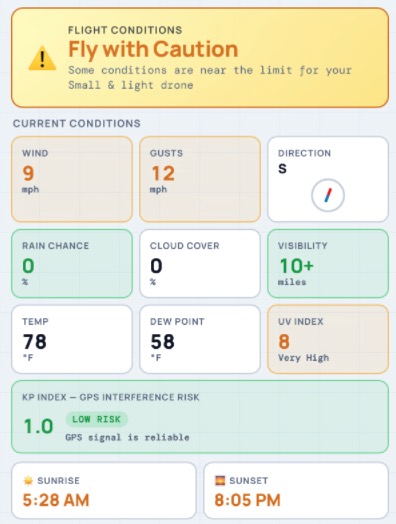
Rotorcast is a free, browser-based drone weather tool. No app to install, no account to create, no paywall. You open it, allow location access, tell it what size drone you’re flying, and it tells you whether conditions are safe.
The go/no-fly verdict is the main event, but it’s backed by a full conditions grid so you can see exactly what’s driving the result: sustained wind, gusts, rain probability, cloud cover, visibility, temperature, dew point, UV index, and Kp index. That last one is something most casual pilots don’t know about. The Kp index measures geomagnetic activity from solar wind, and when it spikes, it can mess with GPS signal reliability. A drone without GPS lock behaves unpredictably. Worth knowing before you fly.
There’s also a three-day hourly forecast with a scrollable strip that starts from your current hour and color-codes each slot the same way the main verdict does. Past hours are dimmed. The current hour is highlighted so you can orient yourself immediately.
The Drone Size Selector
One of the things I thought hardest about was how to handle wind thresholds. A DJI Mini 4 Pro at 249 grams has very different wind tolerance than a DJI Mavic 3 at 895 grams, and those are both very different from a heavy commercial rig. But asking a first-time pilot to look up their drone’s exact specs before they can check conditions creates friction I didn’t want.
The solution was to skip the jargon and use plain language:
- Small and light covers DJI Mini series, Holy Stone, toy drones like our P70
- Mid-size covers DJI Air 2S, Mavic series
- Large/pro covers heavy commercial drones
- Not sure defaults to the most conservative thresholds
Each category maps to calibrated wind and gust limits behind the scenes. The P70 falls squarely in the small and light bucket, which means the app flags anything above 10 mph sustained or 15 mph gusts as conditions to avoid. That’s appropriate for a 1.28-pound drone with no GPS and no return-to-home.
How I Built It
The whole thing runs as a single HTML file, which means it deploys as a static site with no backend and no ongoing server costs. It’s hosted on Cloudflare Pages via a GitHub repository and lives at rotorcast.maker404.com.
All the data sources are free with no API keys required:
- Weather comes from Open-Meteo, which provides wind, gusts, precipitation probability, cloud cover, visibility, temperature, dew point, and UV index
- Kp index comes from NOAA’s Space Weather Prediction Center, which publishes geomagnetic data in real time
- Sunrise and sunset come from sunrise-sunset.org
- Location name uses the Nominatim reverse geocoder from OpenStreetMap
The browser’s built-in Geolocation API handles location detection. The whole stack is genuinely free to run at any scale.
Building it took a few sessions of iteration: getting the layout compact enough to show all the key conditions without scrolling, making the hourly strip start at the current hour rather than midnight, getting the visibility numbers to convert properly from meters to miles (Open-Meteo returns everything in meters regardless of what you ask for), and making sure the Now card in the hourly strip uses real-time data rather than the hourly forecast model so the numbers match the main grid.
Light mode and dark mode are both supported, along with a system preference option that just matches whatever your phone is set to.
Where This Fits for Recreational Pilots
If you read the previous post and came away thinking the pre-flight checklist was more involved than you expected, Rotorcast is designed to make one part of that simpler.
The practical flow I use now before taking the P70 out:
- Open Rotorcast and check the go/no-fly verdict
- If conditions are good, open B4UFLY and confirm there are no airspace restrictions or TFRs at the location
- Grab the drone
That’s it. The weather check takes about fifteen seconds. The airspace check takes another thirty. Everything after that is flying.
The Promark P70 is a forgiving learner drone in a lot of ways, but wind is not one of them. It has no GPS stabilization, which means in gusty conditions it drifts, requires constant correction, and quickly gets outside a beginner pilot’s ability to recover. Knowing the gust forecast before heading outside has already saved us from a couple of sessions that would have ended in frustration rather than fun.
What’s Coming
Version two of Rotorcast will add airspace status for your current location, showing whether you’re inside or near controlled airspace and what class it is. That data exists in a free public FAA dataset, and displaying it contextually alongside the weather conditions is a natural next step.
Until then, Rotorcast handles the weather side of the pre-flight check, and B4UFLY handles the airspace side. Between the two of them, a recreational pilot has everything they need before leaving the house.
Try it at rotorcast.maker404.com. No account, no install, no cost.