Maker Journal
I Stopped Being a Minecraft Player and Became the Server Admin
How I run a safe, private Minecraft server for my kids and their friends, with Discord as my remote control, and why I wanted it to be simple this school year.
At some point, I stopped playing Minecraft and started running it.
It didn’t happen on purpose, and the timing is funny. I’m starting a new school year in a new school district, which means new people, new systems, and a long list of things I’m still figuring out. In the middle of all that, the one thing I wanted to work without thinking about it was the family Minecraft server.
A while back I wrote about rendering our world into a web map every night, which was about how the family looks at the world. This post is about how we live in it.
The goal was simple: a safe place for my kids and their friends to play together. No strangers, no drama, and no dad being asked for things every five minutes.
Simple, right? Not quite. Here’s what I learned.
The Setup, in Plain English
Our server is a private family-and-friends world. Only people I’ve approved can join, and there’s a small cap on how many can be on at once. The difficulty is set to easy.
When you join, you’re greeted with the rules:
- Be kind and use appropriate language.
- Don’t break or take other players’ builds or items.
- Don’t hurt other players or their animals.
- Create, don’t destroy.
Four short rules that a kid can actually remember. I tried longer versions first. Nobody read them.
Problem #1: “Someone Hurt My Dog”
If you’ve ever run a kids’ server, you know this one. A kid spends an hour taming a wolf, names it, and then a friend wanders by and swings a sword at it. Cue tears.
I didn’t want to ban anyone over a pet. I also didn’t want “please be nice” to be the only protection.
So I set up a small ladder:
- First try: a friendly warning that named pets are protected.
- Second try: a firm final warning.
- Third try: five minutes in “pet jail,” where you can’t break or place blocks.
- After that: a short 30-minute break from the server.
The pet itself is never harmed, and the counter resets every 45 minutes so nobody carries a grudge forever.
What I like most: it’s a consequence the kids understand. It’s quick, it’s fair, and it happens without me having to jump in.
Problem #2: “Dad, Can I Have…?”
Minecraft has a lot of items. My kids want all of them. Usually right now, usually while I’m in the middle of something.
I wanted to say yes more often, and I wanted to stay in charge of what’s handed out. So I built a small helper that lives in our family Discord.
Here’s how it works:
- A kid types what they want in their own words, like “can I have 64 emerald blocks.”
- The helper figures out who’s asking and what they want.
- I get a message with two buttons: Approve and Reject.
- One tap, and the items show up in their inventory.
The kids get quick answers. I get the final say. Nobody has to stop their game to come find me.
There’s also a /suggest command in the game. A kid can type an idea or a complaint and it lands in a Discord channel for me to read. That channel has become my favorite part of the whole setup. It’s where I learn what they actually want next.
Discord: My Server Remote Control
The item helper is only one piece. Over time, Discord has turned into the control room for the whole server, and it fits in my pocket.
Here’s what shows up on my phone without me logging in to anything:
- Who’s online. Every time someone joins or leaves, a short message appears with how many people are playing. I can tell at a glance whether the kids are on, and who with.
- Blocked visitors. If someone who isn’t on the approved list tries to join, I get a message with their name. That’s how I find out when a friend of a friend is knocking, and decide whether to let them in.
- Moderation alerts. If a pet-jail or regular jail is used, it’s posted in the channel, so I always know what happened and who was involved.
- Update warnings. Once a week, a check runs and tells me which add-ons are out of date. I don’t have to remember to look.
- Server chat. What’s said in the game shows up in Discord, and what I type in Discord shows up in the game. I can say hello or tell them dinner’s ready without opening Minecraft.
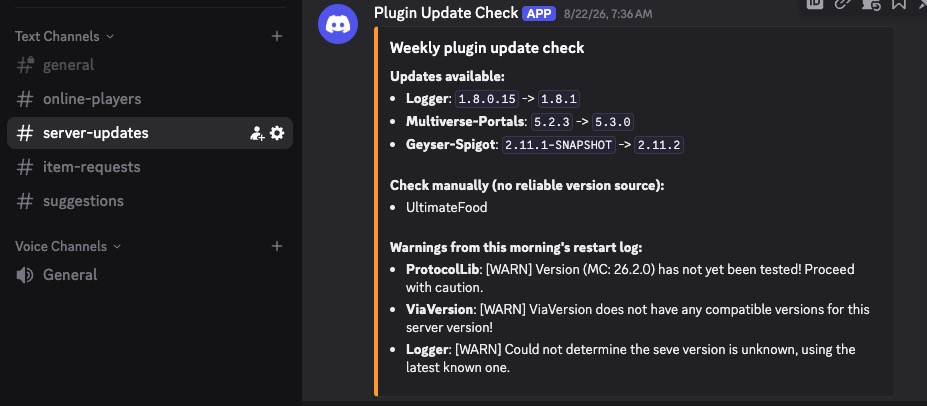
The weekly update check, posted to Discord once a week.
And then there’s the part that really changed things for me: a private channel where I can type simple commands and the server just does them.
Need to approve a new friend? Add them to the list from the couch. Someone stuck in a wall at 9 PM? A quick command from my phone gets them out. The kids’ item requests come to me as a tap. Before this, every one of these meant sitting down at the computer, logging in, and finding the right window. Now I do it in the time it takes to send a text.
The honest caveat: that command channel is powerful, so it’s locked down to just me. Only the people I choose can see it, and I’d think hard before giving anyone else access.
It’s changed how I feel about running the server. A small problem used to be something I’d have to remember to deal with later, and now it takes a minute from wherever I am. If something does need a real computer, I at least know about it right away instead of finding out the next morning.
Problem #3: Everyone Plays on Something Different
My family doesn’t all use the same device. Some of us are on computers, some are on consoles or tablets. Normally those players can’t join the same world.
A pair of add-ons fixed that. Now everybody, whatever they play on, ends up in the same world.
I also bought a friendly web address so the kids can type something easy to remember instead of a long string of letters and numbers. One small thing I’d tell any parent: a short, easy address makes getting friends online much less painful.
Problem #4: The Chat That Went Quiet
This one drove me a little crazy.
One of the kids could type in chat and everyone could see it. But he couldn’t see what anyone else wrote. It lasted for days, and restarting the game didn’t fix it.
I checked everything on the server. Nothing was wrong. The server was working perfectly.
The real culprit was an Xbox privacy setting on his account. It only let him see messages from people on his Xbox friends list, so everyone else was being quietly filtered out.
The fix wasn’t a setting on my server at all. The kids needed to send each other friend requests on Xbox.
Lesson learned: when something’s weird, check the server logs first. If the server shows everything working, the problem is probably on the player’s side.
Problem #5: The Power Went Out
A while back we lost power at home. When it came back, the computer started the Minecraft server before the internet was ready. The game worked fine, but the Discord connection quietly failed and never came back, so no notifications for hours.
Now the startup waits for the internet before it does anything else. It’s a tiny change, but it means I don’t have to wonder whether the server is really OK after a storm.
Worlds for Every Mood
One world got boring fast, so now we have several, all connected by portals:
- A lobby that works as a home base
- The regular survival world
- Oneblock, where you start on a single block and build outward
- Hogwarts, for the Harry Potter fans
- Middle-earth, for the Lord of the Rings fans
- A few extra adventure worlds
The kids pick based on their mood. Some days it’s building. Some days it’s wizards. All it takes is stepping through a portal.
There are also mods that let them turn into mobs. I didn’t plan to add those, and they’ve been the biggest hit.
Keeping It Boring (On Purpose)
Most of the work behind the scenes is invisible, and that’s the goal.
- Nightly backups, so a bad day never costs us a world.
- A weekly check for updates, which posts to Discord when something needs attention. We run about two dozen add-ons, and keeping them current is the difference between smooth and broken.
- Automatic restarts so the server stays fresh without me thinking about it.
The best compliment a server can get is that nobody notices it.
Lessons
- Most “tech” problems were really people problems. Pets, sharing, asking for stuff. The tools just made the rules enforceable.
- Short rules beat long ones. Kids will remember four.
- Check the logs before blaming the server. Or the kids.
- Put the server where you already are. Discord on my phone beats a computer I have to be sitting at. Small fixes happen right away instead of piling up.
- Let the kids drive. The
/suggestchannel tells me what to build next better than guessing does. - When everything else is new, keep one thing simple. A server that runs itself is worth more than a clever one I have to babysit.
- Gentle consequences work. A few minutes in pet jail teaches more than a lecture.
What I’d Do Differently
- Set up the update checks from day one instead of after things broke.
- Write the four rules before the first kid joined.
- Ask the kids what they wanted before I built things for them.
Final Thought
I started this to give my kids a safe place to play. I ended up with something bigger: a little community with its own rules, its own worlds, and its own ways of asking Dad for things.
This fall, with so much else changing, I’m glad this part just works. That’s really what I was after the whole time: a setup that stays simple, so I can spend my energy on the new things instead.
If you run a server for your own family, I’d love to hear what’s worked for you.
Maker404: building things with the family, one problem at a time.